Thursday, 16 April 2026

PAC Learning Explained

PAC Learning Explained Simply

PAC Learning (Probably Approximately Correct)

🔹 What is PAC Learning?

PAC stands for Probably Approximately Correct. It ensures that a learning algorithm produces a model that is approximately correct with high probability.

🔹 ε (Epsilon) – Error Tolerance

It represents the maximum acceptable error.

Example: ε = 0.05 means 5% error allowed (5 mistakes out of 100 emails).

🔹 δ (Delta) – Confidence

It represents how confident we are in the model.

Example: δ = 0.01 means 99% confidence that the error will be ≤ 5%.

🔹 Real-Life Example (Spam Detection)

Suppose you are building a spam classifier:

  • ε = 0.05 → 5% error allowed
  • δ = 0.01 → 99% confidence

This means your classifier has 99% confidence that the error is less than or equal to 5%.

🧠 Memory Trick

ε = error you allow
1-δ = confidence about error

🔹 Hypothesis Space (H)

Hypothesis space is the set of all possible models (rules) that a learning algorithm can choose from.

Example:

  • If email contains "free" → Spam
  • If email contains "offer" → Spam
  • If email length > 100 → Spam
  • Always Not Spam

All these possible rules together form the hypothesis space H.

Why Hypothesis Space Matters?

  • Large hypothesis space → more choices → harder to learn
  • Small hypothesis space → easier to select the best model
  • More hypotheses require more training data

🔹 Sample Complexity Formula

m ≥ (1/ε) [ ln|H| + ln(1/δ) ]

Improved (Standard) Form:

m ≥ (1/2ε²) ln(2|H|/δ)

Where:
m = number of training samples
|H| = size of hypothesis space
ε = error tolerance
δ = confidence parameter

✅ Use Case 1: How Much Data is Needed?

Problem:

You want to train a classifier with the following requirements:

  • ε = 0.05 (5% error allowed)
  • δ = 0.01 (99% confidence)
  • |H| = 1000 (number of possible hypotheses)

Formula Used:

m ≥ (1/ε) [ ln|H| + ln(1/δ) ]

Substitute Values:

m ≥ (1 / 0.05) [ ln(1000) + ln(1 / 0.01) ]

m ≥ 20 [ ln(1000) + ln(100) ]

ln(1000) ≈ 6.9,    ln(100) ≈ 4.6

m ≥ 20 × (6.9 + 4.6)

m ≥ 20 × 11.5 = 230

Final Answer:

You need at least 230 training samples (emails) to ensure the classifier achieves ≤ 5% error with 99% confidence.

🔹 VC Dimension (Model Capacity)

VC Dimension measures the capacity or complexity of a model — how well it can fit different patterns.

Simple Idea:

It is the maximum number of points that a model can perfectly classify in all possible ways.

Example:

  • A line can classify 3 points in all ways → VC = 3
  • But not 4 points → so VC = 3

Why Important?

  • Higher VC → more complex model
  • Needs more data
  • Risk of overfitting

🔹 Inductive Bias

Inductive bias is the set of assumptions a learning algorithm makes to generalize beyond the training data.

Examples:

  • Linear classifiers assume the decision boundary is a line.
  • Decision trees assume data can be split hierarchically by features.
  • k-NN assumes nearby points have similar labels.

Key Idea: Without inductive bias, learning is impossible — because infinitely many hypotheses could fit the training data.

🔗 Relation Between PAC Learning and Inductive Bias

  • PAC requires inductive bias: To achieve PAC guarantees, the learner must restrict itself to a hypothesis space (H). This restriction is the inductive bias.
  • Bias defines hypothesis space size: Stronger bias → smaller hypothesis space → less data needed.
    Weaker bias → larger hypothesis space → more data required.
  • Bias vs Generalization: PAC learning explains when a given inductive bias leads to good generalization. Too weak bias → huge H → impractical data requirement.
    Too strong bias → may miss the true concept.
  • VC Dimension Connection: Inductive bias determines the VC dimension of the hypothesis space. PAC learning uses VC dimension to estimate how much data is required for reliable learning.

🔹 Conclusion

Think of PAC learning as a contract:

If you give me enough data (based on ε, δ, |H|, or VC dimension),

Then I promise that, with high probability, my model will be approximately correct on unseen data.

✔ In simple terms:

More data → Better guarantee of accuracy and confidence.

Thursday, 2 April 2026

java api versus software api


🍴 The “Java API” vs “Your Software API” Story

Imagine your software system as a big kitchen:

  • The kitchen has all the ingredients, tools, and recipes inside (your classes, methods, data structures).

  • You don’t want everyone to go inside and touch the raw ingredients, because it’s messy and unsafe.


1️⃣ Java API = Pre-made Kitchen Tools

  • Java provides a ready-to-use kitchen:

    • java.util → utensils and containers (ArrayList, HashMap, etc.)

    • java.io → cooking equipment for input/output

    • java.net → tools to communicate with other kitchens

  • These are packages, grouped sets of classes and methods

  • That’s why someone says: “Java API is a collection of packages”

💡 Analogy:

Java API = a set of pre-made kitchen tools and ingredients you can use directly without cooking them yourself.


2️⃣ Your Software API = Menu for Others

  • Now you are building a restaurant (your software).

  • You don’t want customers to enter your kitchen — you give them a menu.

    • The menu lists what they can order (functions, services, classes, endpoints).

  • This menu is your API. Others (developers) can use it to interact with your software without knowing the inner workings.

💡 Analogy:

Your API = menu showing available dishes and how to order
Internals = your kitchen (classes, databases, logic)


3️⃣ Key Points

TermPerspectiveExample
Java APILibrary / pre-written classesArrayList, HashMap
Your Software APIInterface for others to use your softwarecreateUser(), getBalance()
  • Java API → you use it

  • Your API → others use your software via it


4️⃣ Visualization (Story)

[Client/Developer]
       |
       v
     [Your API]  ← The menu (methods, endpoints)
       |
       v
   [Your Software]  ← The kitchen (classes, DB, logic)
       |
       v
   [Database / Files / Internals] ← Ingredients & storage

✅ So both statements are correct:

  1. Java API is a collection of packages → tools ready for you

  2. We make an API so others can access software elements easily → your software’s menu for users/developers


Thursday, 12 March 2026

5 Real-World Data Science Projects for Students Using R & Hadoop

Project 1: E-commerce Sales Trend Analysis & Forecasting
Real-world use: Flipkart/Amazon predict monthly sales.

How to Start Today:
1. Download “Retail Sales Dataset” from Kaggle (1.5 GB+)
2. Upload to HDFS
3. Clean with Hive/MapReduce
4. Export to R

library(forecast)
sales <- read.csv("hadoop_export_sales.csv")
ts_data <- ts(sales$MonthlySales, frequency=12)
forecast <- forecast(ts_data, h=6)
plot(forecast)

Project 2: Movie Recommendation System (Most Popular!)
Real-world use: Netflix “You may also like” using MovieLens dataset (1M+ ratings).

Simple Architecture (5 Easy Steps)

  1. Storage Layer → Raw ratings in Hadoop HDFS
  2. Processing Layer → MapReduce or Hive creates User-Item matrix
  3. Export Layer → Pull cleaned data
  4. Analysis Layer → Build model in R with recommenderlab
  5. Output Layer → Top 10 recommendations + ggplot charts

library(recommenderlab)
ratings <- read.csv("ratings.csv")
realMatrix <- as(ratings, "realRatingMatrix")
recom <- Recommender(realMatrix, method="UBCF")
pred <- predict(recom, realMatrix[1], n=10)
as(pred, "list")

Project 3: Social Media Sentiment Analysis on Big Tweets

Dataset: COVID or 2025 election tweets from Kaggle

library(syuzhet)
tweets <- read.csv("cleaned_tweets.csv")
sentiment <- get_nrc_sentiment(tweets$text)
barplot(colSums(sentiment), las=2)

Project 4: Customer Churn Prediction for Telecom

Dataset: Telco Customer Churn (Kaggle)

library(caret)
data <- read.csv("churn_data.csv")
model <- train(Churn ~ ., data=data, method="rf")
confusionMatrix(model)

Project 5: Website Log Analysis for User Behaviour

library(ggplot2)
logs <- read.csv("hadoop_processed_logs.csv")
ggplot(logs, aes(x=Page, y=Visits)) + geom_col()

Final Tips to Finish Fast

  • Setup Hadoop single-node in 30 mins (see my earlier post)
  • Use RStudio + Hive (all free)
  • Resume line: “Built Movie Recommendation System using Hadoop HDFS + R – processed 1M ratings”
  • Start with Project 2 today!

Which project are you starting first? Comment below — I’ll send full code + dataset links free!


Monday, 9 March 2026

Apache Hadoop ecosystem

 The Apache Hadoop ecosystem is a collection of tools and components that work together to store, process, manage, and analyze very large datasets (Big Data) efficiently across clusters of computers.

1. What is Hadoop Ecosystem?

The Hadoop ecosystem refers to a set of open-source tools and frameworks built around Hadoop that help in:

  • Storing huge volumes of data

  • Processing data in parallel

  • Managing cluster resources

  • Querying and analyzing data

It allows organizations to process structured, semi-structured, and unstructured data such as logs, images, videos, and social media data.

Key idea:
Instead of using one powerful computer, Hadoop distributes data and processing across many machines.


Components of Hadoop Ecosystem

ComponentTypePurpose
Hadoop Distributed File System (HDFS)Core ComponentDistributed storage system for large datasets
Apache MapReduceCore ComponentProcesses big data using parallel computation
Apache Hadoop YARNCore ComponentManages cluster resources and job scheduling
Apache HiveEcosystem ToolSQL-like querying and data warehouse
Apache PigEcosystem ToolData processing using Pig Latin scripting
Apache HBaseEcosystem ToolNoSQL database for real-time data access
Apache SqoopEcosystem ToolTransfers data between Hadoop and databases
Apache FlumeEcosystem ToolCollects log and streaming data
Apache OozieEcosystem ToolWorkflow scheduler for Hadoop jobs
Apache ZooKeeperEcosystem ToolCoordinates distributed services


Core Hadoop (3 main parts)  HDFS → Storage   MapReduce → Processing  YARN → Resource Management

Supporting Tools
  1. Hive, Pig → Data processing/query
  2. HBase → Database
  3. Sqoop, Flume → Data ingestion
  4. Oozie → Workflow
  5. ZooKeeper → Coordination

1. HDFS (Hadoop Distributed File System)


Image

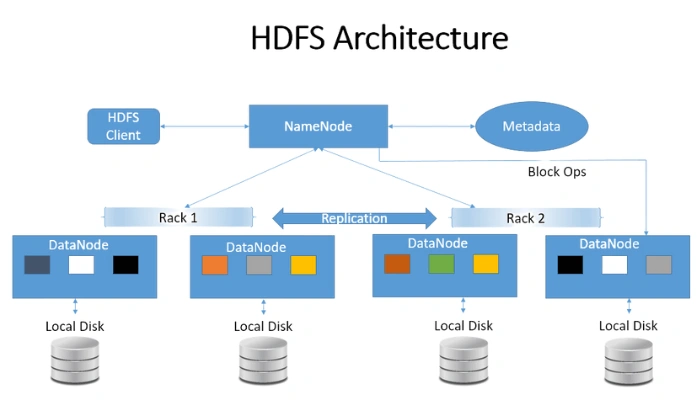
Hadoop Distributed File System is the storage layer of Hadoop.

Key Functions

  • Stores very large datasets

  • Splits files into blocks

  • Distributes blocks across multiple machines

Main Components

  1. NameNode

    • Master server

    • Maintains metadata (file names, locations)

  2. DataNode

    • Worker nodes

    • Store actual data blocks

Advantages

  • Fault tolerance

  • High scalability

  • Handles petabytes of data


2. MapReduce

Image

Image

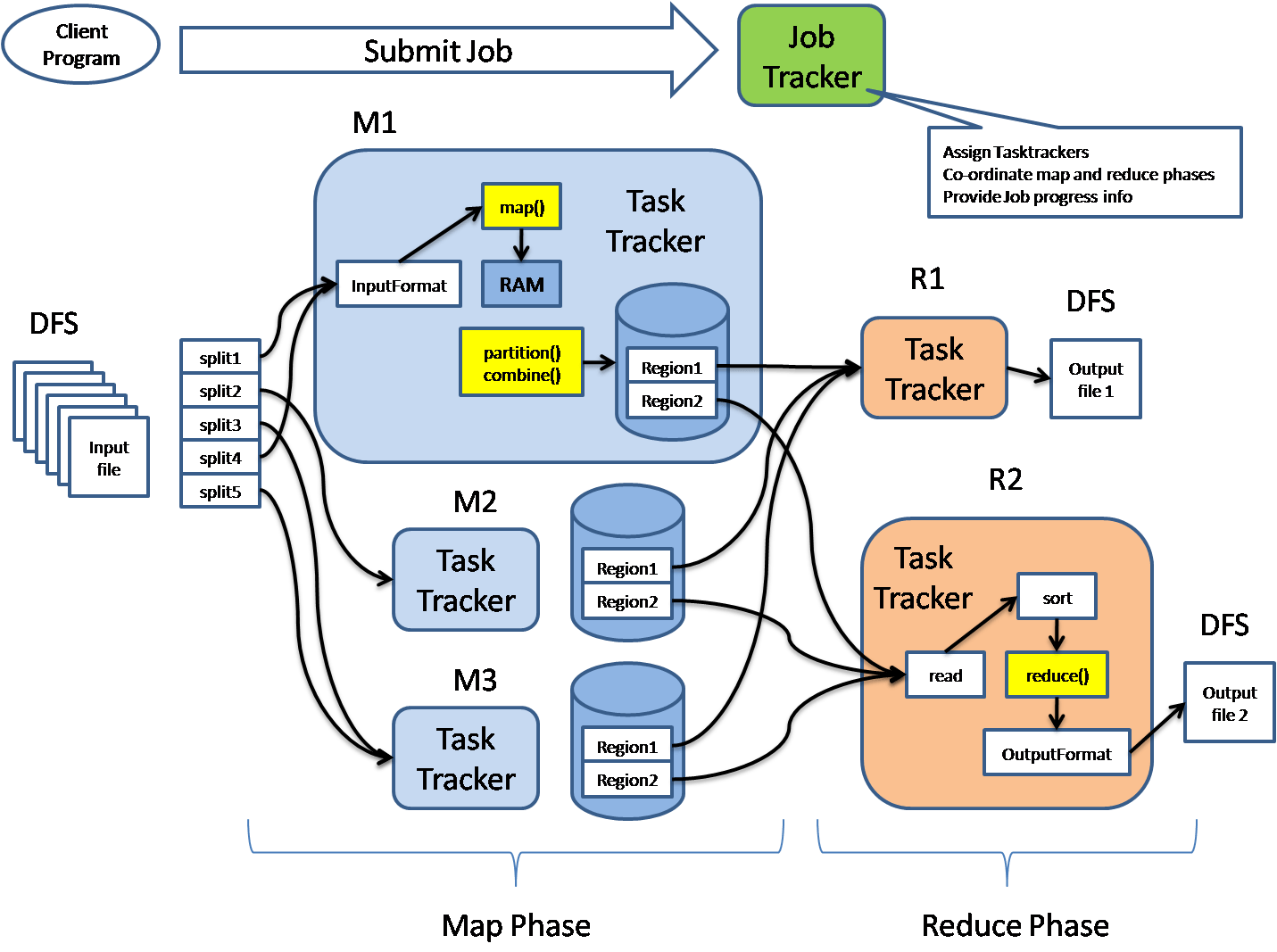
MapReduce is the processing engine of Hadoop.

It processes big data using parallel computation.

Two Main Phases

1. Map Phase

  • Input data is divided into smaller chunks

  • Mapper processes each chunk

  • Produces key-value pairs

Example:

Input: Big data file
Output: (word, 1)

2. Reduce Phase

  • Combines results from mapper

  • Produces final output

Example:

(word, total count)

Advantage

  • Massive parallel processing

  • Handles huge datasets efficiently


3. YARN (Yet Another Resource Negotiator)


Image

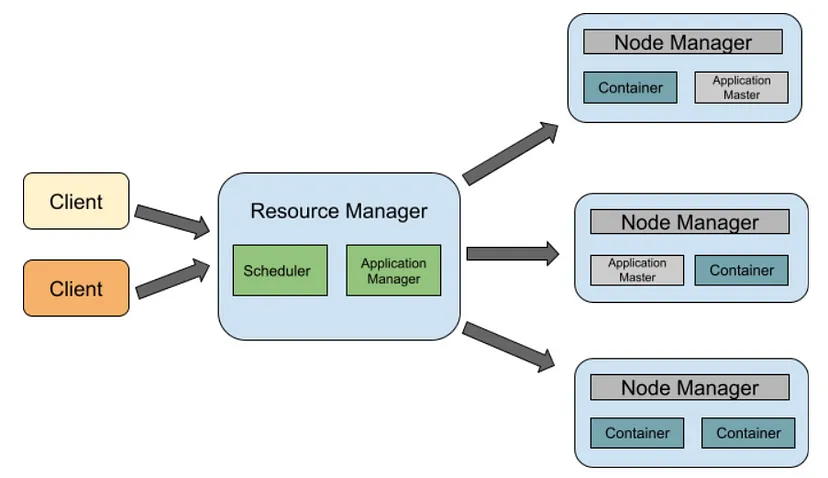
Apache Hadoop YARN manages cluster resources and job scheduling.

Main Components

  1. Resource Manager

    • Global resource management

  2. Node Manager

    • Runs on each node

    • Manages containers

  3. Application Master

    • Manages execution of applications

Role

  • Allocates CPU and memory

  • Schedules jobs

  • Manages cluster performance


Important Hadoop Ecosystem Tools

Besides the core components, several tools support data processing.


4. Hive

Image

Image

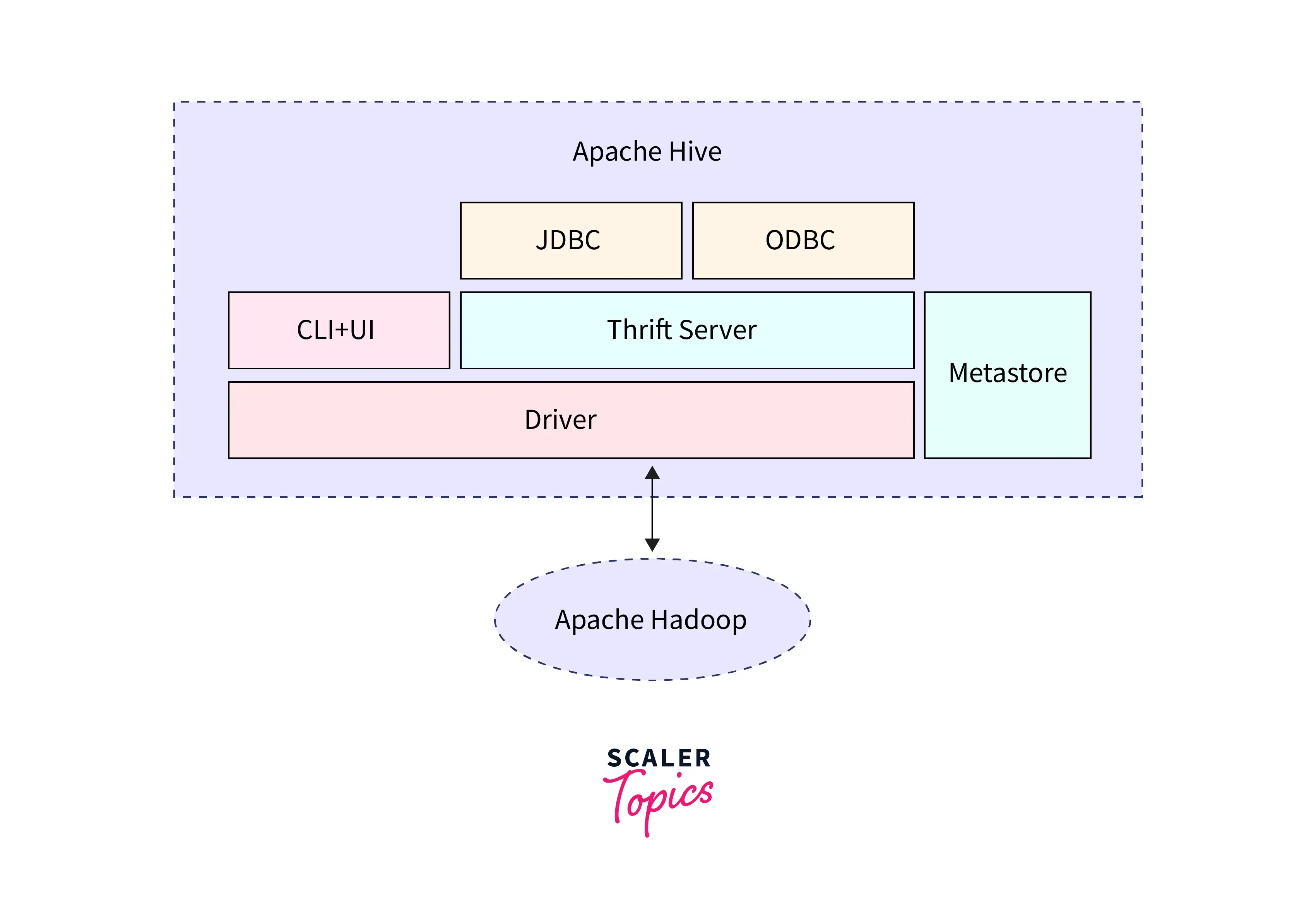
Apache Hive is a data warehouse tool used for querying large datasets stored in Hadoop.

Features

  • Uses SQL-like language called HiveQL

  • Converts queries into MapReduce jobs

  • Used for data analysis

Example query:

SELECT * FROM sales WHERE amount > 5000;

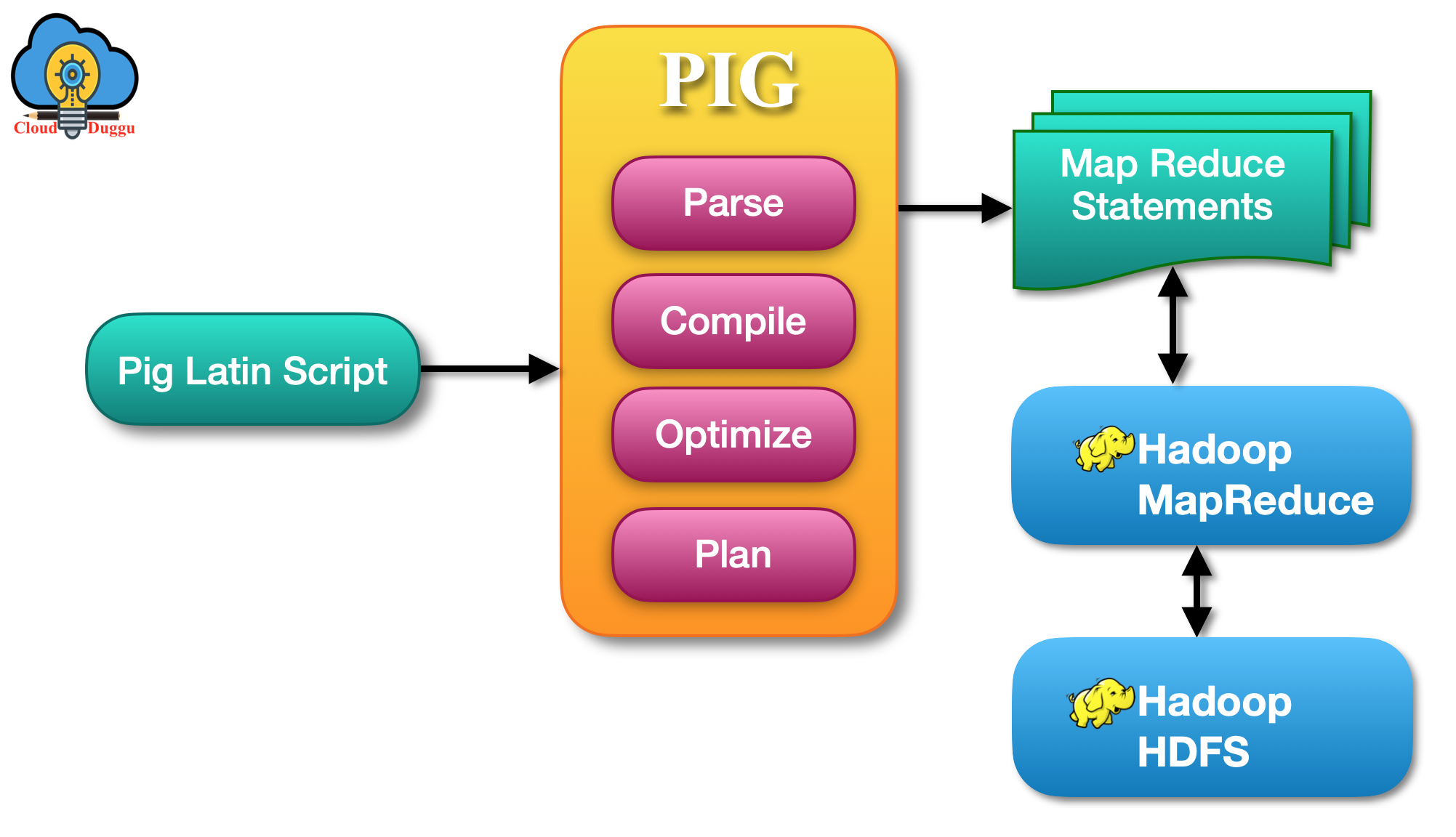
5. Pig


Image


Apache Pig is a high-level scripting platform for processing large datasets.

Features

  • Uses Pig Latin scripting language

  • Simplifies MapReduce programming

  • Handles complex data transformations

Example:

A = LOAD 'data.txt';
B = FILTER A BY age > 20;

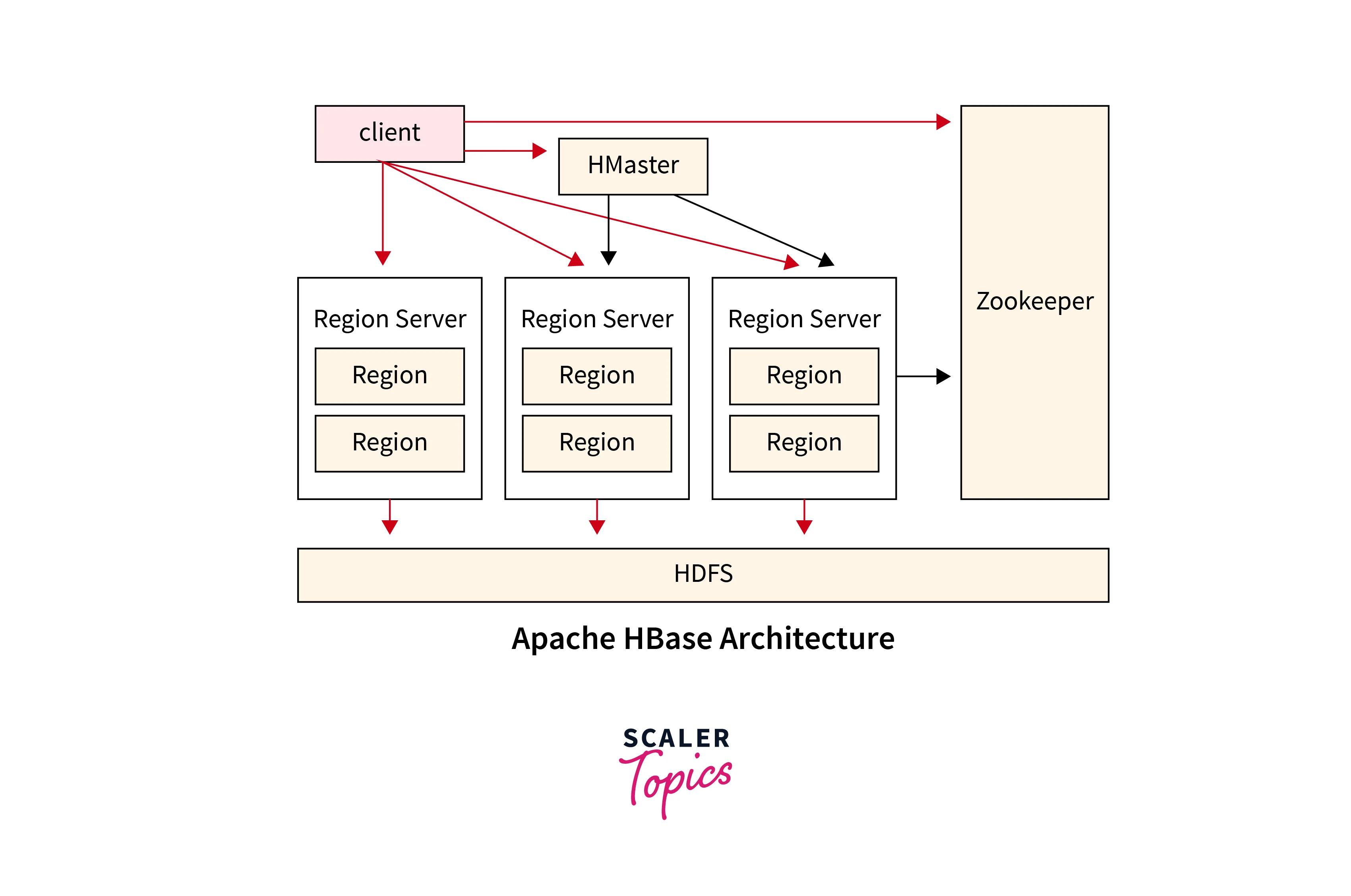
6. HBase


Image

Apache HBase is a NoSQL database built on top of HDFS.

Features

  • Real-time read/write access

  • Column-oriented database

  • Handles billions of rows

Used for applications like:

  • Real-time analytics

  • Online data storage


Key Advantages of Hadoop Ecosystem

  1. Scalability – Handles petabytes of data

  2. Fault Tolerance – Data replicated across nodes

  3. Cost Effective – Uses commodity hardware

  4. Flexibility – Handles structured and unstructured data

  5. Parallel Processing – Faster analysis